Goodwill of Arizona

2021-2022

Empowering job seekers by personalizing online learning
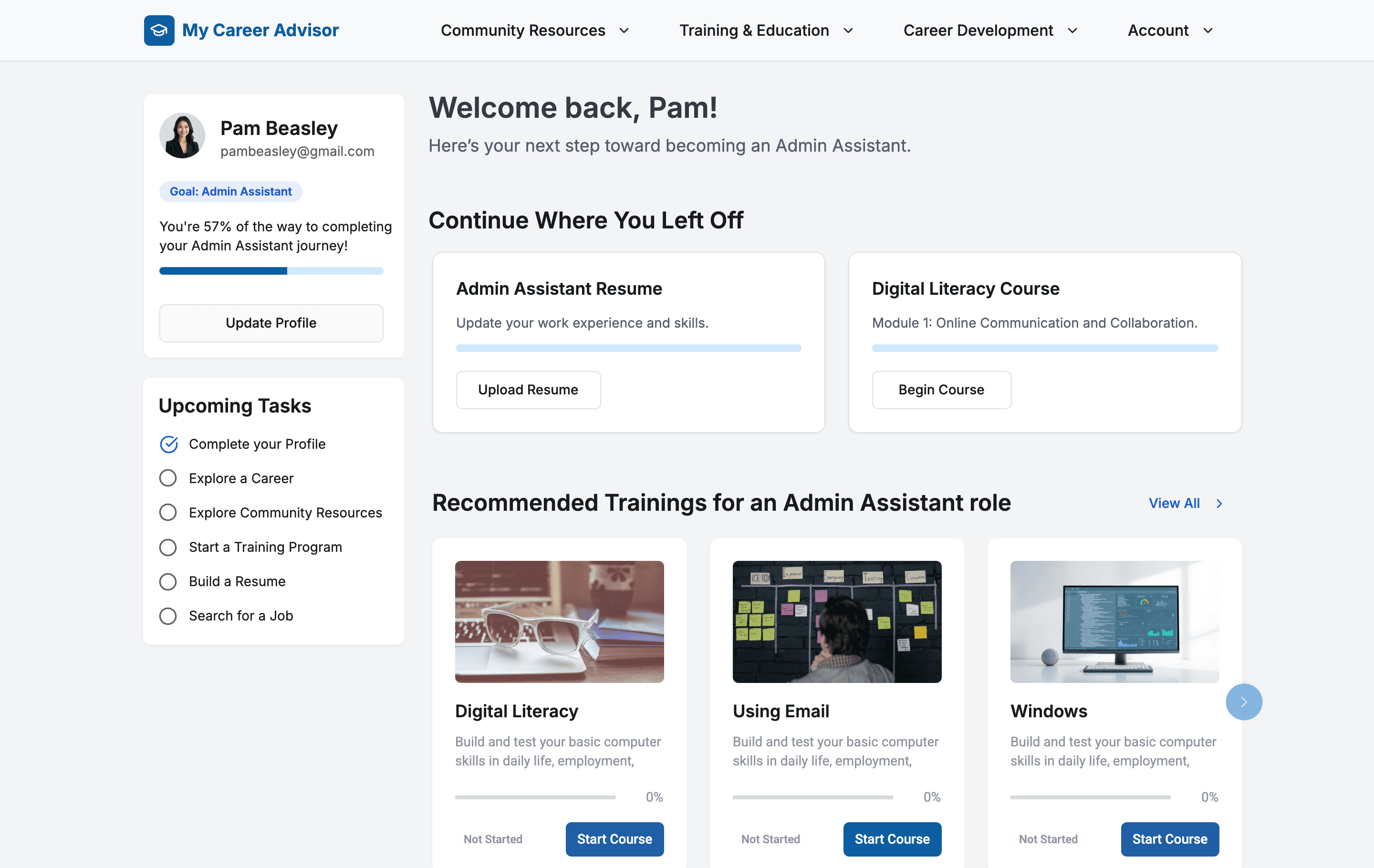
I led UX strategy and redesign for MyCareerAdvisor.com, a Goodwill-powered platform that supports job seekers through online training, resume tools, and job search assistance. As the first designer hired, I built a design foundation from scratch—introducing UX strategy, stakeholder workshops and analytics —while creating a long-term vision for a personalized digital career advisor.

This case study captures how I improved key pages (Homepage and Training flow) to support user readiness and confidence, even as the full redesign was only partially implemented before I transitioned off the project.

Context

Product Designer

UX Strategy, Research, UX/UI

Problem

Faster financial decisions for small businesses

Helped product team validate product-market fit

Actionable dashboard improved client retention

Fewer support tickets after launch

Context

Product Designer

UX Strategy, Research, UX/UI

Problem

Faster financial decisions for small businesses

Helped product team validate product-market fit

Actionable dashboard improved client retention

Fewer support tickets after launch

Context

Product Designer

UX Strategy, Research, UX/UI

Problem

Faster financial decisions for small businesses

Helped product team validate product-market fit

Actionable dashboard improved client retention

Fewer support tickets after launch

Problem area

Lack of personalization created dead ends, not pathways.

Goodwill’s mission is to help individuals—especially those facing systemic barriers—find and keep meaningful jobs. Their platform MyCareerAdvisor.com offered resume tips, basic training, and job board links. But the site was outdated, impersonal, and hard to navigate. Most users had low digital literacy and needed step-by-step support tailored to their current situation—whether they lacked access to transportation, education, housing, or confidence using a computer.

I joined as the first designer with a mission: to transform this static website into a personalized virtual career advisor.

Problem 1

Fragmented experience with little personalization. The platform treated all job seekers the same. Users didn’t know where to begin or what to do next.

Problem 1

Fragmented experience with little personalization. The platform treated all job seekers the same. Users didn’t know where to begin or what to do next.

Problem 1

Fragmented experience with little personalization. The platform treated all job seekers the same. Users didn’t know where to begin or what to do next.

Problem 2

Homepage lacked actionable next steps. It didn’t give users a sense of where they stood or what to prioritize to become job-ready.

Problem 2

Homepage lacked actionable next steps. It didn’t give users a sense of where they stood or what to prioritize to become job-ready.

Problem 2

Homepage lacked actionable next steps. It didn’t give users a sense of where they stood or what to prioritize to become job-ready.

Problem 3

Online training content wasn't personalized based on the jobseeker's current skillset. Training modules lacked visual hierarchy or structure.

Problem 3

Online training content wasn't personalized based on the jobseeker's current skillset. Training modules lacked visual hierarchy or structure.

Problem 3

Online training content wasn't personalized based on the jobseeker's current skillset. Training modules lacked visual hierarchy or structure.

Design goals

What I aimed to achieve

Create a foundation for personalization

Describe

Create a foundation for personalization

Describe

Create a foundation for personalization

Describe

Making the homepage feel personal and actionable

Describe

Making the homepage feel personal and actionable

Describe

Making the homepage feel personal and actionable

Describe

Making online training easier to explore

Describe

Making online training easier to explore

Describe

Making online training easier to explore

Describe

Design decision 01

Creating a digital intake flow to support personalization

When the user landed on the site, there was no digital logic to determine where they should begin. The platform treated all job seekers the same—whether they were starting out, changing careers, or returning after time away. To enable tailored support, I created a digital intake questionnaire mirroring what in-person staff did manually at the career center. It included questions about barriers (e.g., childcare, housing). The responses powered the homepage recommendations and offered support relevant the user.

Onboarding
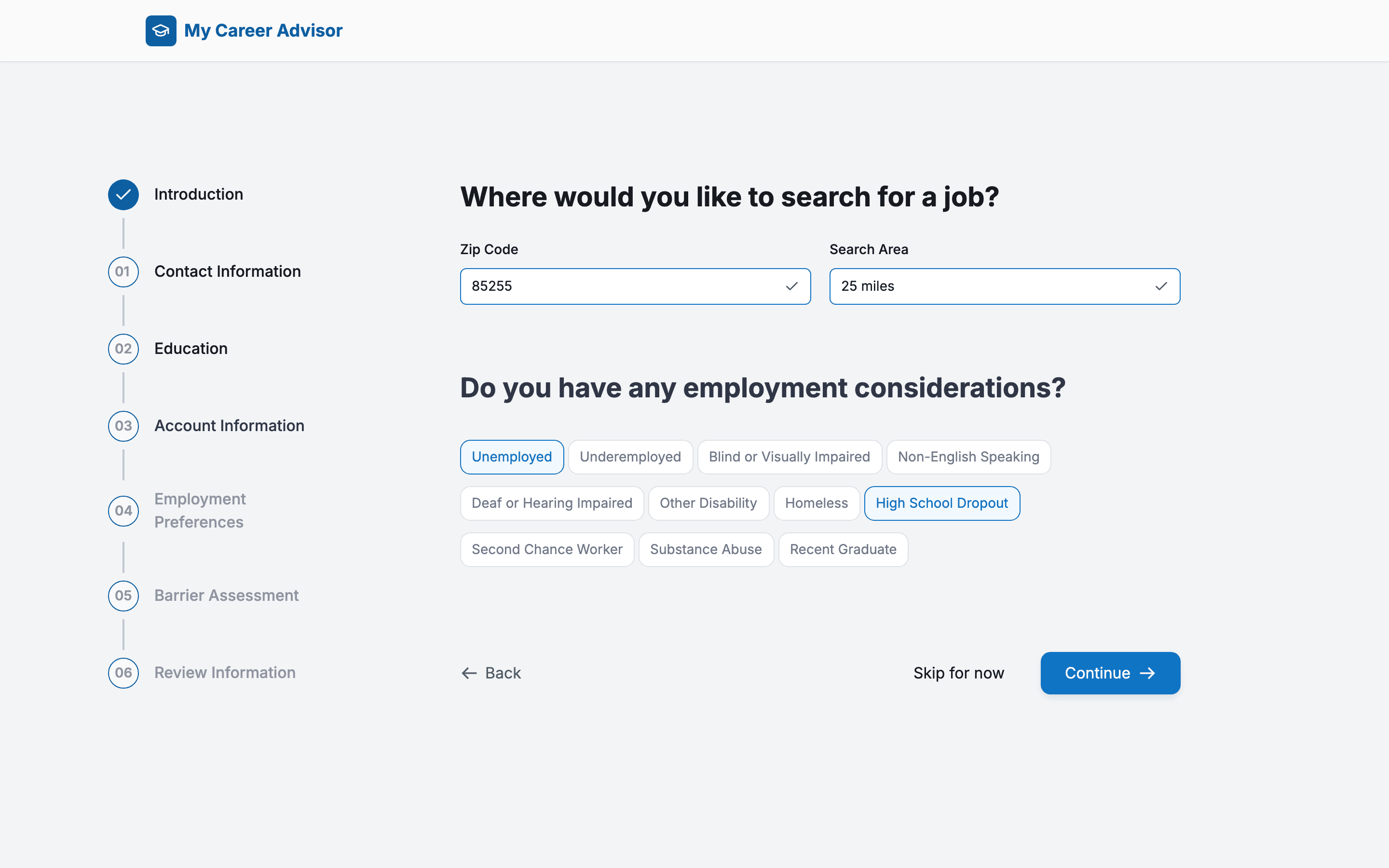
1. Clear step-by-step form with visual progress

Describe

1. Clear step-by-step form with visual progress

Describe

1. Clear step-by-step form with visual progress

Describe

2. Data used to tailor experience

Describe

2. Data used to tailor experience

Describe

2. Data used to tailor experience

Describe

3. Summary screen before submission

Describe

3. Summary screen before submission

Describe

3. Summary screen before submission

Describe

Design decision 02

Making the homepage feel personal and actionable

The homepage became the heart of the personalized experience. After completing onboarding questions, users would land on a dashboard showing top recommended actions (e.g., take digital skills course, build resume) and saved progress. I used progressive disclosure to avoid overwhelming users—allowing them to start small and build momentum over time.

Confirming and reviewing transfer
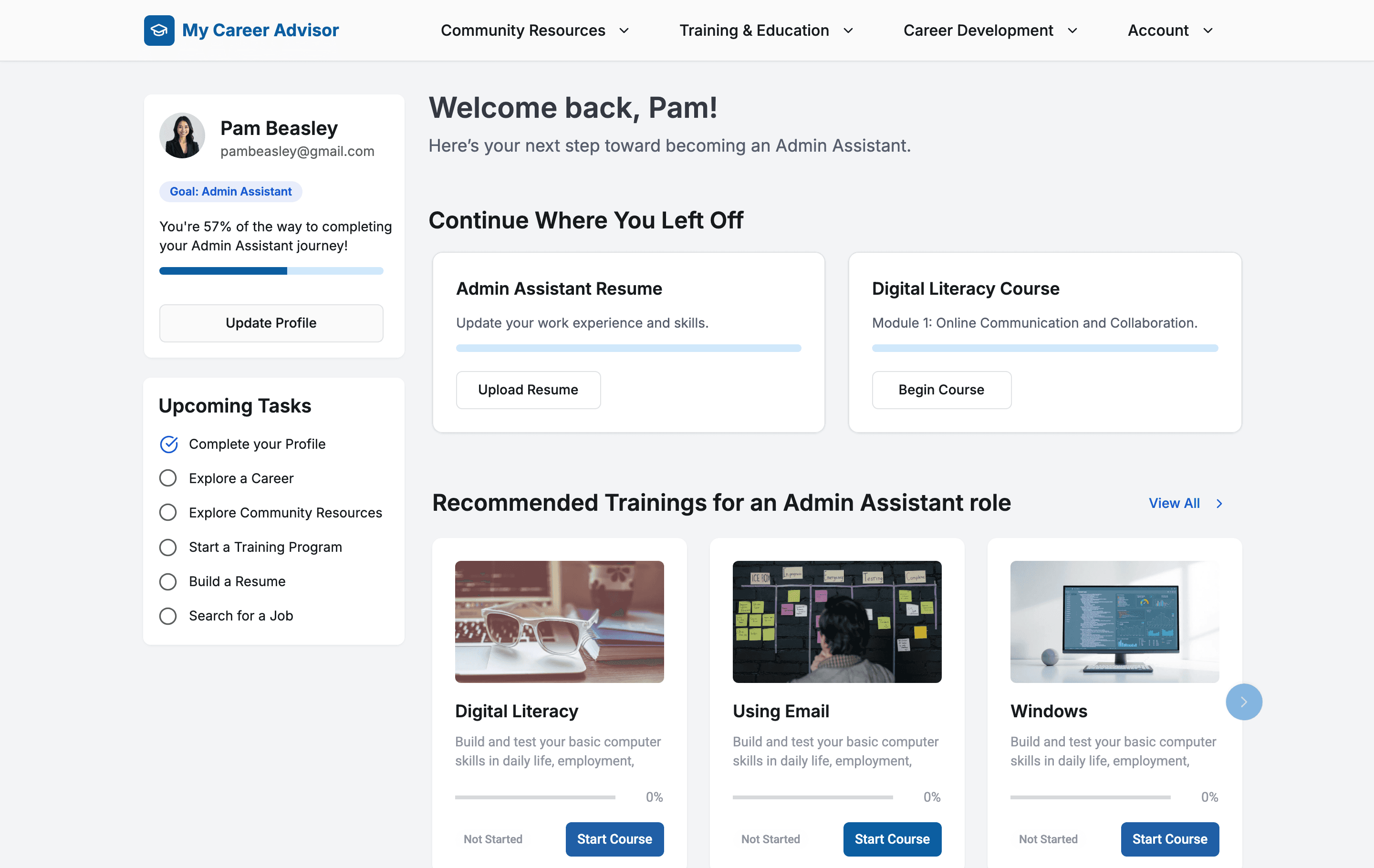
1. “Continue where you left off” tile for easy re-entry

Describe

1. “Continue where you left off” tile for easy re-entry

Describe

1. “Continue where you left off” tile for easy re-entry

Describe

2. Profile readiness score with visual checklist

Describe

2. Profile readiness score with visual checklist

Describe

2. Profile readiness score with visual checklist

Describe

3. Tailored training recommendations

Describe

3. Tailored training recommendations

Describe

3. Tailored training recommendations

Describe

4. Job search and resume builder prompts

Describe

4. Job search and resume builder prompts

Describe

4. Job search and resume builder prompts

Describe

Design decision 03

Making online training easier to explore

Our data showed most users lacked basic digital literacy. Yet training content was buried in long blocks of text, filtered only by location. I redesigned the experience into a scrollable, card-based layout with stronger visual hierarchy and clear module structure to be more scannable and guided.

Online Trainings Screen
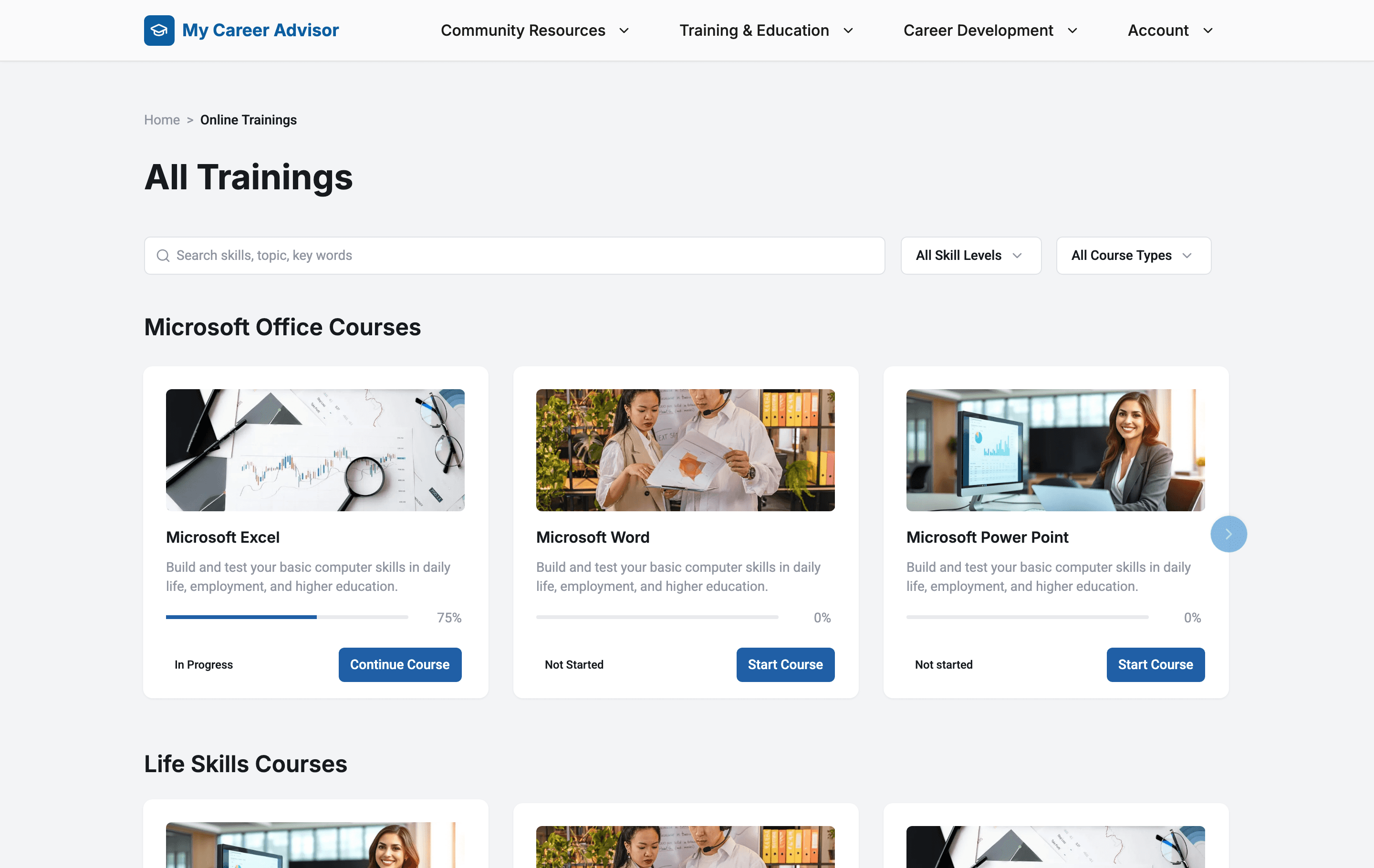
1. Progress indicators

Describe

1. Progress indicators

Describe

1. Progress indicators

Describe

2. Scrollable card layout with module icons

Describe

2. Scrollable card layout with module icons

Describe

2. Scrollable card layout with module icons

Describe

3. Mobile-friendly layout with simplified IA

Describe

3. Mobile-friendly layout with simplified IA

Describe

3. Mobile-friendly layout with simplified IA

Describe

Retrospective

Designing for guidance, not generic access

Before and After redesign

Impact

Higher completion rates

More users successfully completed onboarding and training paths.

Higher completion rates

More users successfully completed onboarding and training paths.

Higher completion rates

More users successfully completed onboarding and training paths.

3x team growth

Established UX as a priority, leading to the hiring of 3 designers.

3x team growth

Established UX as a priority, leading to the hiring of 3 designers.

3x team growth

Established UX as a priority, leading to the hiring of 3 designers.

B2B expansion

The redesigned platform was in process of being adopted by other Goodwill stores, demonstrating its value beyond Arizona.

B2B expansion

The redesigned platform was in process of being adopted by other Goodwill stores, demonstrating its value beyond Arizona.

B2B expansion

The redesigned platform was in process of being adopted by other Goodwill stores, demonstrating its value beyond Arizona.

Learning 01

Broad tools felt impersonal—users needed contextual guidance, not generic options.

Learning 01

Broad tools felt impersonal—users needed contextual guidance, not generic options.

Learning 01

Broad tools felt impersonal—users needed contextual guidance, not generic options.

Learning 02

Personalization isn’t just UX—it’s a trust-building mechanism for vulnerable users.

Learning 02

Personalization isn’t just UX—it’s a trust-building mechanism for vulnerable users.

Learning 02

Personalization isn’t just UX—it’s a trust-building mechanism for vulnerable users.

Learning 02

Early feedback loops with real users were essential for testing assumptions quickly.

Learning 02

Early feedback loops with real users were essential for testing assumptions quickly.

Learning 02

Early feedback loops with real users were essential for testing assumptions quickly.